Next.js Partial Prerendering & Cache Components
Discover how Next.js Cache Components and Partial Prerendering (PPR) allow you to mix static speed with dynamic personalization in a single route.
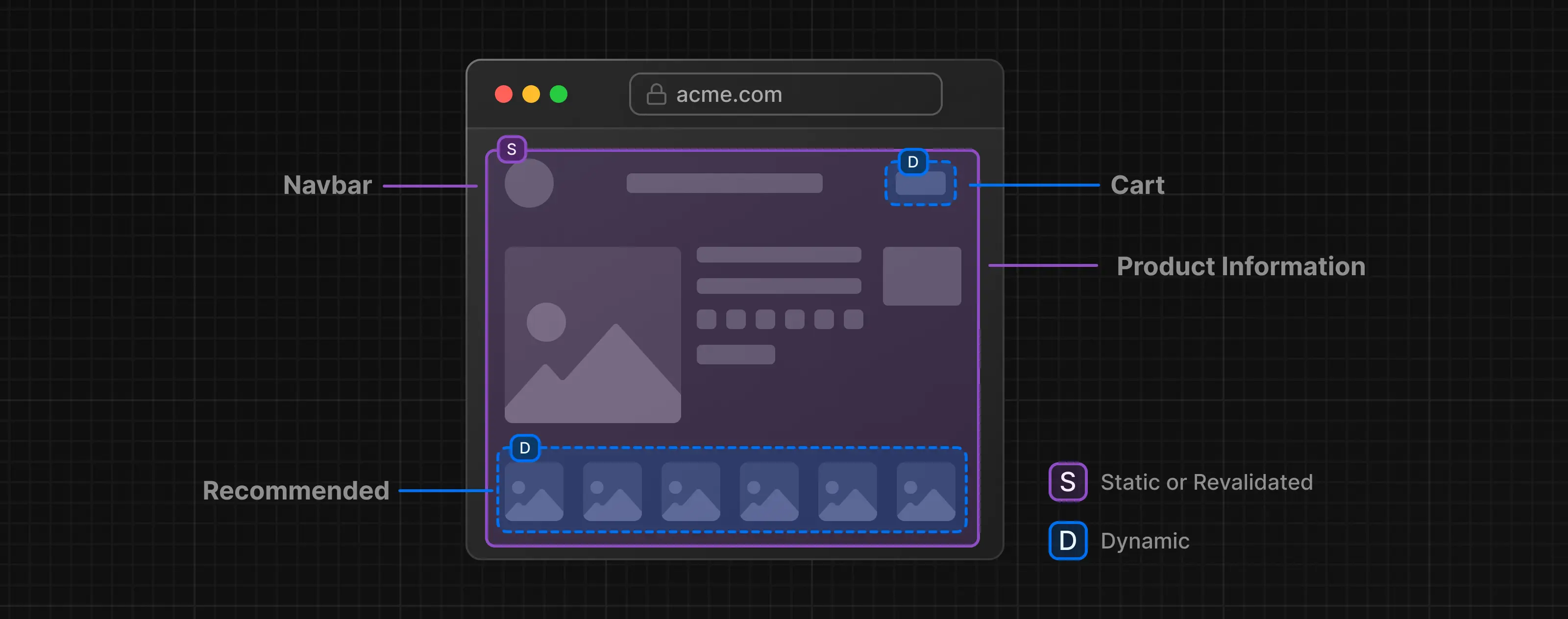
Combining Static and Dynamic Content
For years, web development forced us into a rigid trade-off: Should a page be Static (incredibly fast but potentially stale) or Dynamic (always fresh but slower due to server processing)? Moving everything to Client Side Rendering solved interactivity but hurt SEO and initial load times. Next.js has introduced a paradigm shift with Cache Components and Partial Prerendering (PPR).
Partial Prerendering (PPR) allows you to have the best of both worlds in a single route: a fast, static shell that loads instantly, with dynamic holes that stream in data in parallel.
Static Shell and Dynamic Holes
PPR fundamentally changes how a page is assembled. Instead of waiting for every single database query to finish before showing anything to the user, Next.js splits the page into two distinct parts:
Static Shell: This includes the layout, navbar, footer, and any content that doesn't rely on specific user data. This part is pre-generated and sent to the browser immediately.
Dynamic Holes: These are the parts of the page that require real-time data (like a shopping cart or user profile). They "stream" in asynchronously while the user is already viewing the Static Shell.
Real-World Example: The E-Commerce Product Page
Let's visualize this with a standard shopping page scenario to see how the responsibilities are divided:
Navbar & Logo: Identical for every user. (Static Shell - Loads Instantly)
Product Title & Description: Changes rarely. Can be cached for an hour. (Cached Content - Included in Shell)
Add to Cart / Personal Price: Depends on the logged-in user or active coupons. (Dynamic Hole - Streams in via Suspense)
The New Code Structure
Gone are the days of complex config objects like export const revalidate. We now use directive-based caching with 'use cache' and standard React <Suspense> boundaries.
Here is a complete, clean example showing how these three layers coexist in a single file:
import { Suspense } from 'react';
import { cacheLife } from 'next/cache';
import { cookies } from 'next/headers';
import { Navbar } from './components/Navbar';

// 1. STATIC CONTENT
// The Navbar and layout are part of the Static Shell.
export default function ProductPage({ params }) {
  return (
    <main>
      <Navbar />

      {/* 2. CACHED CONTENT */}
      {/* Loads with the shell, data is cached. */}
      <ProductDetails id={params.id} />

      {/* 3. DYNAMIC CONTENT */}
      {/* Streams in later using Suspense. */}
      <Suspense fallback={<div>Loading your cart...</div>}>
        <UserCart />
      </Suspense>
    </main>
  );
}

// Component: ProductDetails (Cached)
async function ProductDetails({ id }) {
  'use cache'; // Cache directive
  cacheLife('hours'); // Profile: Keep fresh for hours

  const product = await db.getProduct(id);

  return (
    <section>
      <h1>{product.title}</h1>
      <p>{product.description}</p>
    </section>
  );
}

// Component: UserCart (Dynamic)
async function UserCart() {
  const cookieStore = await cookies(); // Opts into dynamic rendering
  const cartId = cookieStore.get('cartId')?.value;
  const cart = await db.getCart(cartId);

  return <div>Items in Cart: {cart.totalItems}</div>;
}
How It Works: Breaking Down the Logic
The magic above happens through four key mechanisms. Here is what each part does:
'use cache': This directive tells Next.js to take a snapshot of the component's output. Even though it fetches data, it doesn't need to run on every request. It runs once (or when revalidated) and serves the result instantly as part of the Static Shell.cacheLife('hours'): This function controls how long the cached data remains valid. It replaces the old ISR (Incremental Static Regeneration) timers. You can specify semantic timeframes like 'hours', 'days', or 'weeks'.cookies()(The Dynamic Trigger): Accessing request-specific data like cookies or headers automatically signals Next.js that this component must be dynamic. It cannot be prerendered because it depends on who is viewing the page.<Suspense>(The Boundary): By wrapping the dynamicUserCartin Suspense, we create a boundary. Next.js sends the Static Shell immediately and shows thefallbackUI (e.g., "Loading your cart..."). Once theUserCartfinishes fetching data on the server, it "streams" into place, replacing the loading message.
Enabling Cache Components
PPR is an opt-in feature. To enable it, add the following flag to your next.config.ts:
import type { NextConfig } from 'next'

const nextConfig: NextConfig = {
  cacheComponents: true,
}

export default nextConfig
Advantages of PPR
Why should you adopt this architecture? Here are the key benefits:
Performance Boost: Since the Static Shell is served immediately (TTFB is minimized), users feel the site is incredibly fast. They don't stare at a white screen while dynamic data fetches.
SEO Compatibility: Search engines can easily crawl the static parts of your page (content, headers, descriptions) without needing to execute complex JavaScript or wait for dynamic streaming.
Better User Experience (UX): It eliminates the "loading spinner hell." The layout stabilizes instantly, and content fills in naturally.
Flexibility: You can mix different data fetching strategies (Static, Cached, Dynamic) in the same component tree without complex hacks.
Common Use Cases
Where does PPR shine the most?
E-Commerce Platforms: Product descriptions and images are part of the Static Shell, while stock availability, personalized pricing, and cart status are Dynamic Holes.
Blog & Content Platforms: The article content is Static/Cached for maximum SEO. The "Comments" section and "Like" buttons are Dynamic Holes that load separately.
Live Data Dashboards: The dashboard layout and sidebar are Static. The real-time charts, notifications, and live feeds are Dynamic Holes that stream in.
Conclusion
Partial Pre-Rendering (PPR) offers a practical way to move forward without having to choose between fully static or fully dynamic pages. Parts of the page that are shared by everyone load quickly, while user-specific data is loaded later when needed. This approach helps keep the application structure simpler, while also providing a faster and smoother experience for users. Setting up and using PPR in Next.js can be a sensible option for those who want to balance performance and flexibility.

Comments
No comments yet be the first to say something.
Leave a comment too